

Siewert & Kau Technologies - EDI - openTRANS 2.1
Everything about the EDI connection at Siewert & Kau
Our EDI interface is based on the industry standard openTRANS 2.1 and enables the secure, automated exchange of orders, shipping notifications, invoices and more – directly between your system and ours.
Here you can find out in compact form how the connection works, which formats we support and which steps are necessary before going live.
General information
Our EDI interface is based on the industry standard openTRANS version 2.1 and is exchanged as XML files via sftp servers. As the openTRANS standard is very complex in its entirety, we have focused on a manageable set of data that can serve a large number of use cases. As documentation for this set, we provide you with so-called XSD files (XML description) and sample XMLs.
As we want to make this interface available to a broad base of our customers, please note that unfortunately no customizations are possible.
Connection process
With the help of our Questionnaire (see below) can be used to identify potential problems before integration. Together we will determine a rough time for the test phase in which we will run through some standard scenarios. Please send the answers to the questionnaire to your sales contact. They will then establish contact for the connection.
The following points will be tested:
- Address data, possibly with different delivery addresses
- Drop-Shipments (optional)
- Ordering (and confirmation, if applicable) of available and unavailable items
- Prices
Once the test phase has been completed, we will schedule a date with you for the interface to go live.
Data transfer
We use the sftp protocol for data transfer to ensure that data is transferred in encrypted form. We are happy to provide you with sFTP access as part of the connection.
Message types
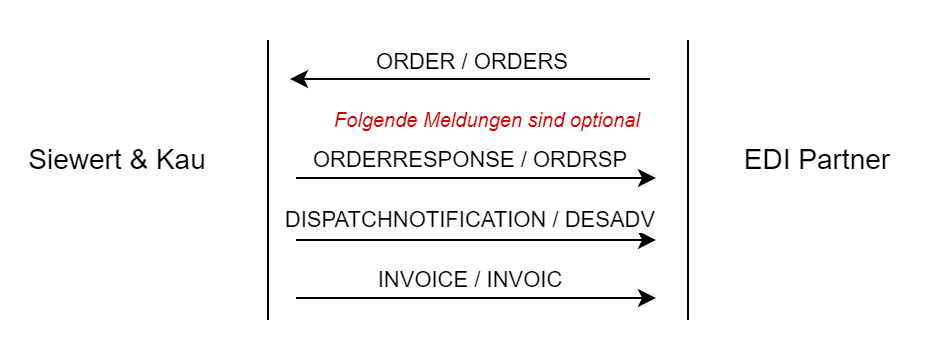
As a customer, you transmit your orders to us via the ORDER-message. As a rule, our system checks every 5 minutes whether there is a new message on the server.
To confirm receipt of the order, our system can send you an automated ORDERRESPONSE.
Deliveries are made via the DISPATCHNOTIFICATION-message is notified. This message lists the delivered items and the tracking numbers (if available) of the shipment.
In addition, our system provides invoices in the form of an INVOICE message.
Communication partner / address data
All four message types contain the PARTIES segment (/ORDER/ORDER_HEADER/ORDER_INFO/PARTIES), which contains the addresses of the buyer, the supplier and the recipient of the goods (delivery). The address type is determined via the “PARTY_ROLE” (/ORDER/ORDER_HEADER/ORDER_INFO/PARTIES/PARTY/PARTY_ROLE) and can contain the following values: buyer, delivery, supplier
An identifier in the form of a GLN must be transferred at least for the buyer and supplier addresses (if you do not have a GLN, this can be requested via GS1 Germany): https://www.gs1-germany.de/gs1-standards/identifikation/unternehmen-gln/ ). Our system can assign the order to your customer account via the GLN. This also ensures that we only process orders that have been addressed to us.
The openTRANS standard also expects these GLNs in the following elements:
/ORDER/ORDER_HEADER/ORDER_INFO/ORDER_PARTIES_REFERENCE/BUYER_IDREF
/ORDER/ORDER_HEADER/ORDER_INFO/ORDER_PARTIES_REFERENCE/SUPPLIER_IDREF
Die GLN der Siewert & Kau lautet: 4262552150008

List of questions for new connections
Please send the answers to the questions to your sales contact. They will establish the contact for the connection.
Siewert & Kau customer number:
GLN:
Have you already gained experience with openTRANS in the past?
Which optional message types should be connected in addition to ORDER?
DISPATCHNOTIFICATION
INVOICE
Should the Siewert & Kau sftp server or one of your company’s sftp servers be used for data exchange?
Own sftp server (send access data if necessary)
Dropshipment delivery bill
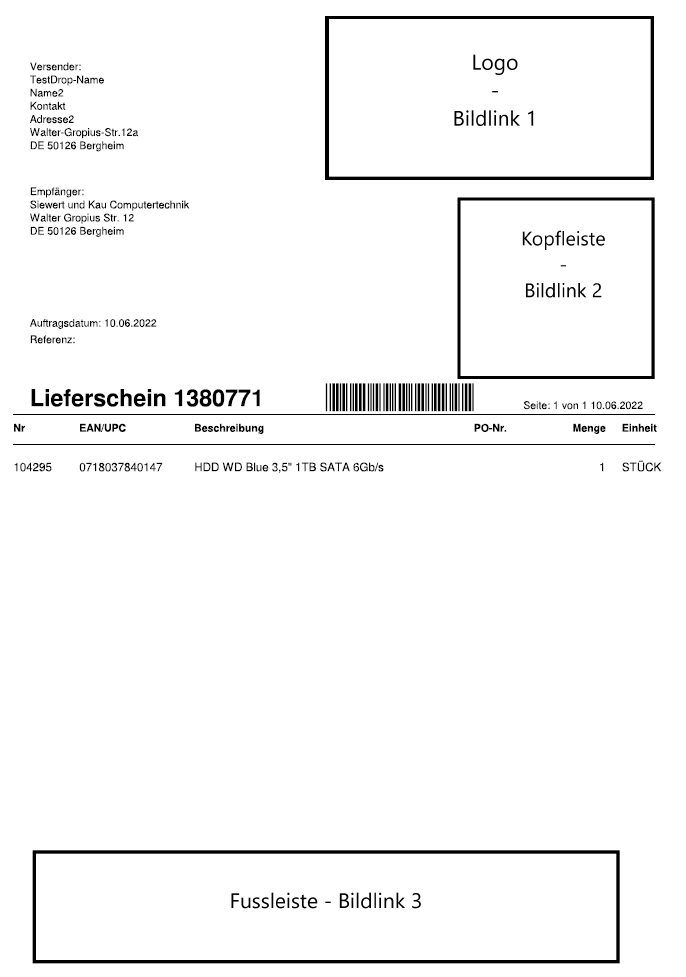
If you would like to send drop shipments directly to your customer via us, we will enclose a neutral delivery bill.
On request, this can be customized with up to 3 pictures. (see graphic on the left)
You are welcome to send them to us directly with the answers to the questionnaire for connection:
– the files must be formatted as *bmp
– the delivery bills are printed in b/w – so please also send the image files in b/w, because of the file size
maximum dimensions/size:
Image link 1 – “Logo”: width 1000px / height 500px
Image link 2 – “Header”: Width 650px / Height 600px
Image link 3 – “Footer”: Width 1800px / Height 350px